Sharpening the house hunting agent
In my last post I described the idea behind the new ‘agentic’ house-hunting app: add a dataset, describe its tables and joins in schema_catalog.py, and let the agent reason over the relationships instead of writing a new tool or prompt branch for every question. In this article I describe the path towards a more robust agent - observable/traceable ‘General Chat’ and a much larger evaluation suite. In addition, I describe how these updates resulted in a more robust agent architecture. The interesting part is not any one feature. These updates make the app behave less like a collection of LLM prompts and more like an agent operating over a data model.
Architecture upgrades
The problem with agents is that the final answer tells you very little about the reasoning behind it. The initial ‘unsegmented’ agent struggled with the following problems:
- the model misunderstood the question
- the wrong table was selected
- a join was wrong
- SQL was generated incorrectly
- the SQL returned zero rows
- the data was missing
- or the final response hallucinated the result
Making rational changes to the agent and measuring whether they actually improved it required two prerequisites: a more comprehensive test suite and traceability/observability.
I added local Phoenix tracing and Prometheus metrics to General Chat. Phoenix runs locally with the application, capturing each General Chat request, LLM calls, tool calls, timing, token counts and errors. The frontend can also associate an answer with its trace so that the user can see the agent’s reasoning step-by-step. This resulted in an explicit debugging path question → model → tools → SQL/planning → database → answer instead of the previous question → answer path.
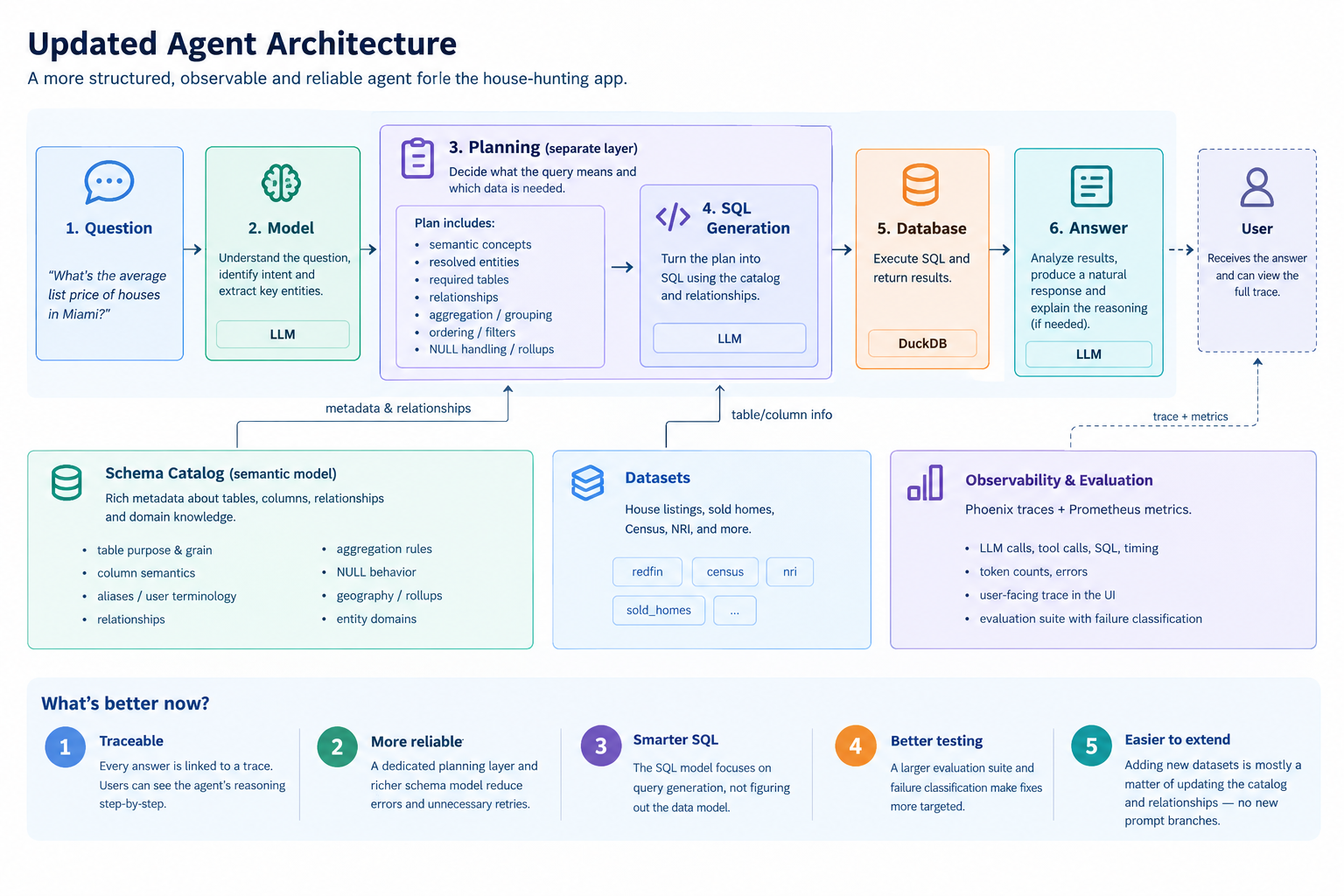
The General Chat answers became traceable
Once Phoenix was in place, I wanted the UI to expose it to the user rather than treating it as a developer-only debugging tool. Each General Chat response is now associated with its trace. This enables two things:
- the user can look into the agent’s reasoning step-by-step
- in the near future, the user will have an option to add the Q&A to the eval dataset as a positive/negative example
For a simple question, the trace might show one database query. For a more complicated question, it can show semantic/schema retrieval, planning, SQL generation, query execution, retries and final response generation. This becomes much more important as the data model gets larger.
A much larger evaluation suite
The original 14-question evaluation set was too small to tell me whether an improvement was real. An agent can pass a few carefully selected examples and still fail on the next variation of the same question. So I expanded the evaluation set to cover:
- house counts and listing status
- price aggregates and rankings
- Walk, Bike and Transit scores
- missing values
- Census MSA and tract questions
- NRI risk metrics and rankings
- sold-home and arm’s-length transactions
- cross-dataset comparisons
- empty-result cases
I also added --skip-house-agent so that I can evaluate General Chat independently.
The traces let me classify failures by stage. This effectively white-boxes the agent: a failure is no longer just “the answer was wrong”. It can be retrieval, planning, SQL generation, execution or final response generation. This makes the fix more targeted.
The traces exposed a problem with the original architecture
The first version of General Chat asked one agent to do too many things at once - understand the question, discover the relevant tables, figure out the relationships, decide what calculation is needed, generate SQL, execute it and explain the result. It performed well for simple questions, but became less reliable as the data model grew. The traces showed examples where the agent:
- selected a semantically related but incorrect table
- inferred the wrong relationship
- treated “my houses” as “my favorite houses”
- generated SQL with the wrong aggregation
- or returned no SQL even though the query was straightforward
Adding more prompt instructions stopped feeling like the right answer. The architecture had to be refined.
Separating planning from SQL generation
I introduced a separate query-planning layer. The planner decides what the query means. The SQL model turns that plan into SQL. The plan can capture semantic concepts, resolved entities, required tables, relationships, aggregation, grouping, ordering, NULL handling, rollups and filters. This creates a cleaner boundary and prevents unnecessary token overhead. A question about flood risk across metro areas should not require the SQL model to rediscover that NRI data is at the tract level and must be related through the Census/CBSA tables. The planning layer establishes that first.
If SQL generation fails, the system can regenerate SQL from the existing plan instead of asking the agent to reinterpret the question. Without this separation, the general instruction prompt would have been much larger, and with the short 24k-token context window, the agent would have had to work with much smaller chunks of generated text.
A mature (not an amateur) schema catalog
This was probably the most important change. schema_catalog.py started as a simple description of tables and columns. It has evolved into a semantic model of the data. It now captures:
- what a table represents and its grain
- what important columns mean
- aliases and user terminology
- valid relationships
- aggregation semantics
- NULL behavior
- geography and rollup relationships
- entity domains
For example, nri_tracts.rfld_risks is not just a floating-point column. It represents a particular NRI measure at a particular level of granularity. If the user asks for an MSA-level answer, the agent needs to understand how that tract-level measure relates to an MSA and how it should be aggregated. That knowledge lives in the data model, not in a prompt branch.
Relationships as part of planning
The data needed for the answer often existed, but the agent did not know how to get from one table to another. This is especially important when combining datasets that use different geographic grains. The relationship layer now describes what a relationship represents and when it is useful. The planner can retrieve the minimal relationship path needed for a question instead of giving the SQL model the entire database graph. This keeps the SQL context smaller, reduces irrelevant joins, and preserves the original philosophy of the app - using generated code, execution and result analysis to answer the question. Adding a new dataset primarily means describing the dataset and how it relates to the existing data, not adding another set of hand-written routing rules.
Metadata retrieval instead of hardcoded routing
It would have been easy to solve an evaluation failure with another rule. For example: if the question contains “hurricane”, use this table. That works for one question, but it is extremely hard to maintain as the number of datasets and questions grows (multiplies). Instead, the planner retrieves the relevant semantic metadata from the catalog. The goal was changed to user language → semantic concept → metadata → relationship path → plan rather than user language → hardcoded route. The vector store helps retrieve relevant metadata, but the structured catalog remains the source of truth. Embeddings can help find the right information; they should not invent database semantics.
SQL generation became a problem that a smaller LLM could solve
Once planning became explicit, the SQL agent could have a much simpler job. It receives the user’s question, the structured plan, the relevant schema and the relevant relationships. This is a much better prompt than giving it the entire database and asking it to figure everything out. If the plan is correct and the SQL is wrong, I know where to look. If the SQL is correct but the answer is wrong, I know the problem is further downstream. The traces also showed that the SQL model sometimes returned no SQL even when the plan was correct. That is much easier to recover from when the intent has already been captured in a structured plan.
Evaluation became part of the architecture
The larger evaluation suite changed how I thought about the app. An evaluation dataset provides a way to test the limits of the agent. It includes both typical questions and edge cases that test the limits of the architecture. The agent is now at a stage of becoming a self-improving system. The future plan is to use the evaluation dataset to tune the model and architecture.
Takeaways
The intent of the app was never to answer “can the LLM answer questions about several datasets?” The real question was: can the agent reliably reason over an evolving data model, and can I improve it continuously by identifying where it fails? The important changes were therefore less about adding another feature and more about creating the structure around the agent.
The app is still a work in progress, and it is still very much a ‘blank canvas’. But the architecture is starting to settle into something that can scale - the catalog describes the data, the planner decides what needs to be computed, the SQL agent figures out how to express it, and the traces show what actually happened. That is a much better foundation than continuing to add prompt instructions every time the agent encounters a new question.
Code’s on GitHub. Same closing note as last time: none of this replaces an actual realtor, an actual inspection or actually walking the block at 7pm on a Tuesday. It just means better and more relevant data, better inferences, better decisions.