Building a house-hunting agent - going beyond a guided story-driven dashboard
In my last post I listed out the data that doesn’t make it onto Redfin/Zillow/Realtor, explained why (Fair Housing Act, NAR Code of Ethics), and introduced my ‘hand coded’ Shiny dashboard that layers some of that data on top of Redfin favorites. This post is about the app that extends it - built with the previous app as the starting point and almost entirely coded by prompting Claude instead of hand-writing it - and about the questions that Redfin/Zillow/Realtor aren’t allowed to answer.
The goal - and what it does today
Redfin/Zillow/Realtor or a buyer’s agent are allowed to hand you the raw numbers because those are “objective, third-party-sourced” facts. What none of them can do, for the same NAR/fair-housing reasons covered last time, is to derive inferences to questions like: is this area actually crime prone, is this price actually fair, does a 45 out of 100 walk score mean anything in practice. Answering such questions for a broad public audience at platform scale is considered ‘steering’ - Redfin’s AI is trained not to do that. This app fills that void for an individual - it is intended to be a personal tool to assist in the decision-making process, but not to make broad generalizations and/or recommendations.
That’s the goal: take exactly the inputs Redfin is legally allowed to show, and actually answer questions based on the data - choose datasets based on your priorities to extend this application to your own needs.
What that looks like today:
- Per-house chat grounded in one house listing - Redfin fields, FEMA’s National Risk Index for census tract, property description I pasted in from Redfin/Zillow/Realtor, median $/sqft from active listings in the same tract, median $/sqft from arm’s-length deed sales in that tract, and the nearest comparable active listings - all three, with counts and dates.
- General chat for anything that isn’t about one house. Eg: “which of my cities have the highest wildfire risk,” “what fraction of my favorites have a walk score over 70”.
- A map of favorited listings with descriptions and photos attached per house and saved automatically as I go.
Only publicly available data is ingested and used to answer questions.
Architecting the new app
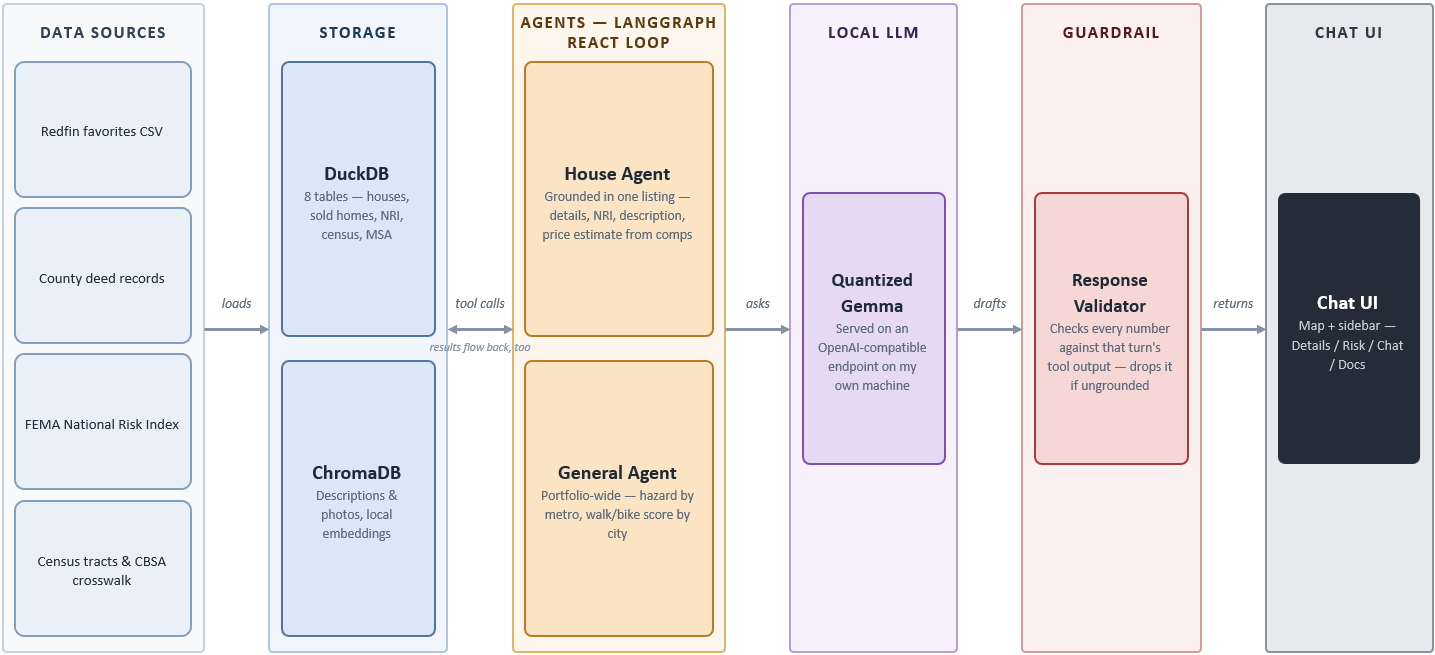
‘Static’ data layer
Redfin favorites with additional data at a house level is the starting point of the new app. This app uses a FastAPI backend, two separate LangGraph agents (general and house-specific), a DuckDB schema and a ChromaDB vector store for descriptions and photos. The following services are executed for loading different types of data:
- A geocoding pipeline
services/geocoder.py(address → lat/lon, used for sold-homes): cache → Census Batch Geocoder → Census single-address lookup;services/geo_utils.py(lat/lon → tract FIPS): NRI geometry cache → TIGER/Line shapefiles → Census Geocoder API - A data loader for Redfin, NRI, Sold, and Census
- A vector database for descriptions and photos
Prompting Claude through that stack one subsystem at a time turned “several months” into evenings and weekends. Scripts such as debug_flood_query.py, debug_nri_columns.py and diagnose_msa.py still sit in the repository - these are remnants of the step-by-step process; scripts written to handle bad joins, missing data (eg: msa_code), etc.
Why a ‘code agent’?
Here, “code agent” means something narrower than “an agent that involves code”. The terminology comes from Hugging Face’s smolagents.CodeAgent - tool calls are “formulated by the LLM in code format, then parsed and executed”. The model writes actual Python code, runs in a sandboxed interpreter with tools available as importable functions. Whatever it ‘prints’ (~returns) becomes the next observation for the agent.
‘Code agent’ implementation approach
The execution graph in this app is standard LangGraph - a ToolNode with tools bound using .bind_tools(), structured tool_calls routed by a conditional edge back to the model or to END. The approach matches that of ToolCallingAgent, not CodeAgent. But it takes inspiration from CodeAgent. get_database_schema hands the model the tables, the columns, the valid joins, etc; query_database lets it write and run the actual SQL. Tools are not handwritten for every type of question; the model gets the schema and writes the join itself. Metadata in - code out, instead of a person pre-enumerating every join or every question as its own function.
A few question types are routed to purpose-built tools listed directly in the system prompt. query_database only gets used once none of those apply - the model writes its own query instead of filling in parameters - only in general chat for now. The per-house agent’s five tools - comps math, the NRI lookup, document search, and the rest - all have their data-access logic already written in; none of them take a query from the model. Extending the schema-driven path to house-scoped questions is on the list below, next to the data sources still missing.
Frontend - middleware - backend
Frontend: static/index.html, static/app.js (682 lines, no framework, no build step), static/style.css - Leaflet plus its marker-cluster plugin for the map, marked for rendering whatever markdown the agent sends back, both pulled from a CDN rather than bundled. No WebSocket, no SSE - app.js talks to the backend with plain fetch() calls and waits for the full JSON response each time, chat included.
Middleware: FastAPI’s CORSMiddleware with (allow_origins=["*"]) because nothing but localhost is ever going to call it. main.py also serves the frontend itself: the / route reads index.html and rewrites its /static/*.js and .css references with an MD5 hash of current contents computed once at startup. So a restarted server never hands the browser a stale cached copy of either.
Backend: main.py also contains /api/* routes:
get_housesreads thehousestable and reshapes it into GeoJSON for Leafletget_housejoins in NRI data, saved documents, and price history for one listingfavoriteflips a boolean - favorites within Redfin favorites
The two routes that matter are /api/house/{id}/chat and /api/chat, and both do exactly one thing: hand the message and history to run_house_chat or run_general_chat and return whatever comes back. All the actual reasoning - tool selection, SQL, validation - happens one layer down, in the agent graphs described above. The API layer is deliberately thin to offload the intelligence to the LLM.
The local LLM layer
Local vs Cloud is a choice based on several factors (expressivity, cost, latency, privacy, etc.) - I chose the former just to test myself. The app can easily be configured to use a Cloud LLM.
The first attempt was Gemma-4 through Ollama, CPU-only: about 10 tokens/second. That’s slow enough to kill any individual’s interest in the app. Choosing a smaller model (8B or lower; usually smaller context window) can bring the whole model in memory and can reduce the latency, but the LLM/agent call usually breaks the context length limit - this is a fatal error. After some experimentation, I settled on a quantized model (Gemma-4-26B-A4B-it-GGUF at Q3_K_M) served through llama.cpp’s llama-server instead of Ollama - full GPU offload, flash attention on, an 8-bit KV cache; roughly 60 tokens/second without a significant loss in performance or context size (~29k tokens supported in my 16GB GPU).
Small local models will confidently hand you a markdown table of numbers they never actually queried. That’s exactly why response_validator.py, the regex bypasses, and the “always call check_data_availability first” rule in the system prompt all exist. A small model needs more scaffolding around it - Claude can be used to produce additional scaffolding around new data sources or tools.
Future plans
This app is a step up on reasoning, but it’s a step back on data coverage. The following data sources (already present in the other app) will be added in the near future:
- Crime: the old pipeline pulled and standardized incident-level data from city open-data portals (e.g. Minneapolis). The new schema still carries a
crime_citycolumn - the same linking idea as before, which city’s crime data a house should join against - but the actual ingestion and cross-city standardization needs to be rebuilt. - Neighborhood-scale walkability and bike/pedestrian infrastructure - the EPA Smart Location Database and city-specific sources like BikePGH - existed in the old R pipeline and haven’t been ported yet.
- FEMA flood hazard boundaries: NRI gives a tract-level composite score today, which is coarser than the actual Special Flood Hazard Area polygons the old app drew on the map (the ones with a Pittsburgh-specific rendering bug I fixed a while back). Getting the boundary layer back, not just the composite score, is on the list.
- Zillow’s home value index and market heat index - the city-cycle context behind the charts in the last post - aren’t in the new app at all yet.
- Sold-home comps currently have a real parser for one county (Allegheny) and a generic fallback for everything else; more county parsers means the price-estimate tool is only as good outside that metro as the fallback allows.
- Schema-driven SQL for the house agent: right now
query_databaseonly exists in general chat; the per-house agent’s five tools are all hand-written. Giving it the same path as general chat is the natural next step.
None of this is a redesign - it’s re-plumbing existing data into the new schema. Each new data source or tool can be “Clauded” and added to the respective prompts as needed.
Code’s on GitHub. Same closing note as last time: none of this replaces an actual realtor, an actual inspection or actually walking the block at 7pm on a Tuesday. It just means better and more relevant data, better inferences, better decisions.